Data retention
ThreatVIS Unified Security Operations Platform keeps different kinds of data for different periods, and you set each separately. Two pages hold the settings: Retention Policy for raw evidence and signed exports, and Index Settings for searchable events and closed Cases.
Role needed: a user with the Admin or Super Admin account type. A user with a custom role needs Settings access and, under Data & Storage, Retention Policy with Read to view and Set to change. Both pages use the same module.
These periods describe data held on the appliance, so they are limited by its storage. Keeping data for years is the job of a long-term archive outside the appliance.
| Data | What it is | Page | Default |
|---|---|---|---|
| Searchable events | Parsed events you search, alert on and report on. | Index Settings, Deleted | 7 days |
| Closed Cases | Closed Case records. | Index Settings, Case retention | 7 days after last update |
| Raw evidence | Events exactly as received, before parsing. | Retention Policy, Local raw evidence | 7 days, or the appliance default shown on the page |
| Signed exports | Archive files made when searchable events or closed Cases are deleted. | Retention Policy, Signed export archive | 365 days |
Set raw evidence retention
Raw evidence is kept so events can be verified or processed again. It does not change how long events stay searchable.
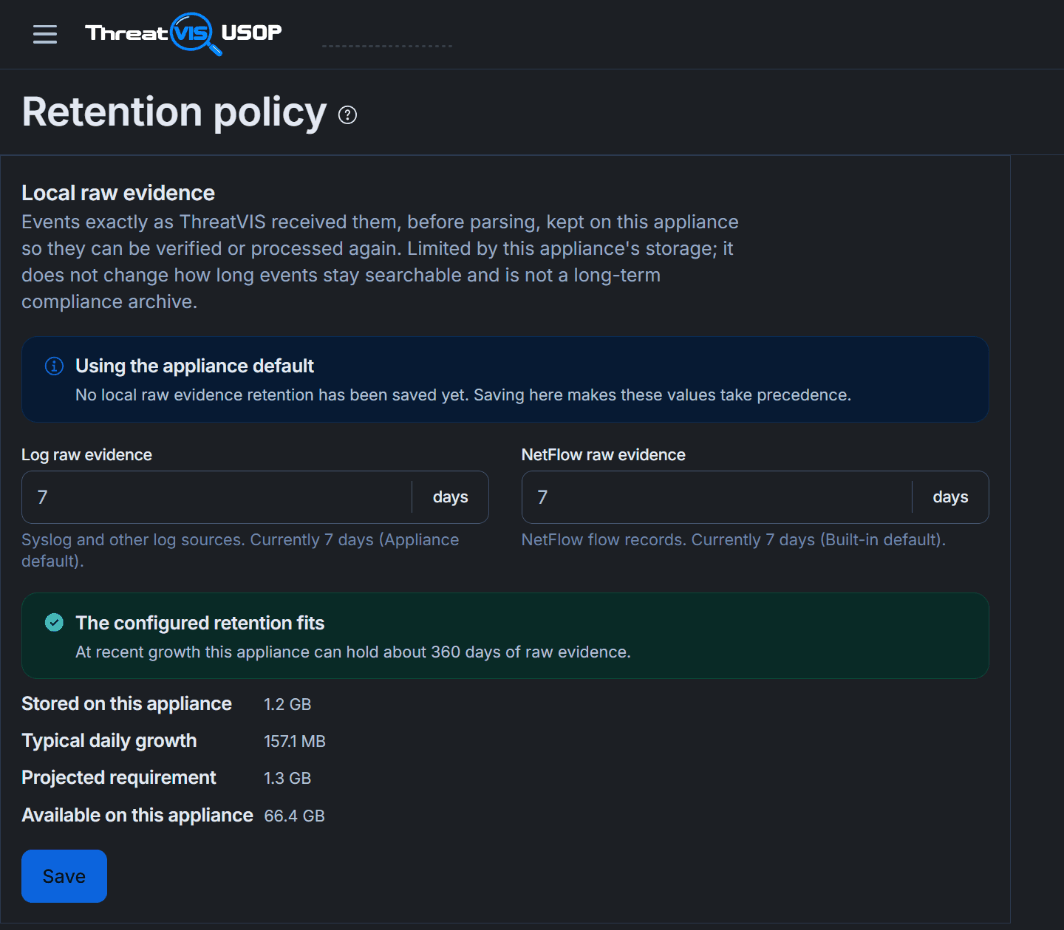
The Local raw evidence panel on the Retention policy page, before any value is saved, with the storage summary under the fields.
- Select Settings, then Retention Policy under Data & Storage.
- Under Local raw evidence, enter a number of days in Log raw evidence and in NetFlow raw evidence. Each is a whole number of at least 1. The help text under each field shows the period now in effect and where it comes from.
- Select Save. The console shows Local raw evidence retention saved.
Until you save a value, the page shows Using the appliance default. Once you save, your value takes precedence.
Under the fields the page shows whether the periods fit the storage:
| Line | Meaning |
|---|---|
| Stored on this appliance | How much raw evidence is stored now. |
| Typical daily growth | Recent daily growth, or Not enough data. |
| Projected requirement | The storage your periods need at that growth. |
| Available on this appliance | The space available. |
The headline above them reads The configured retention fits or The configured retention is projected not to fit. Other headlines say there is not enough history yet (an estimate needs 3 complete days), that no evidence is stored yet, or that storage information is unavailable. The projection is an estimate and never changes your retention.
If the periods do not fit, ThreatVIS USOP does not delete evidence early. When the disk is nearly full it pauses writing raw evidence until space is freed. Shorten the retention or add storage before that happens.
Set how long signed exports are kept
- Select Settings, then Retention Policy.
- Under Signed export archive, enter Delete signed exports after, in days. The minimum is 1.
- Select Save. The console shows Signed export retention saved.
Before searchable events or a closed Case reach the end of their retention, the appliance exports them to a signed archive. This setting is how long those exports are kept. See Log Archive and Signed.
Set how long events and Cases are kept
- Select Settings, then Index Settings under Data & Storage.
- Under Log index lifecycle, set the stages that events move through by age from the moment they are created:
- Open: events are searchable. This stage has no setting.
- Closed: after this many days events are kept but are no longer searchable. Enter 0 to skip the stage. The default is 0.
- Deleted: after this many days events are exported to a signed archive file and permanently removed. The minimum is 1 and the default is 7. Deletion always happens: you can only set when.
- Under Case retention, set the days after which closed Cases are archived and deleted. The minimum is 1 and the default is 7. The age counts from the last update of the Case. Open Cases are never deleted automatically, however old. A Case's alerts expire separately and are not set here.
- Select Save. The console shows Index Settings saved.
The Closed period cannot be longer than the Deleted period. If it is, the console shows Closed period cannot exceed Total period and saves nothing.
Read the index list
Below the settings, Index list shows Total indices, Open log indices and Closed log indices. The table lists every index with its Name, Documents, Size and Status. Type in Search to filter it, and select the refresh button to reload it.