Cluster
A ThreatVIS Unified Security Operations Platform Cluster runs on three or more processing nodes that are all active. It adds capacity as you add nodes, and it keeps running when a node fails. This page explains how a Cluster works. To compare it with the other models, see Deployment models.
How it works
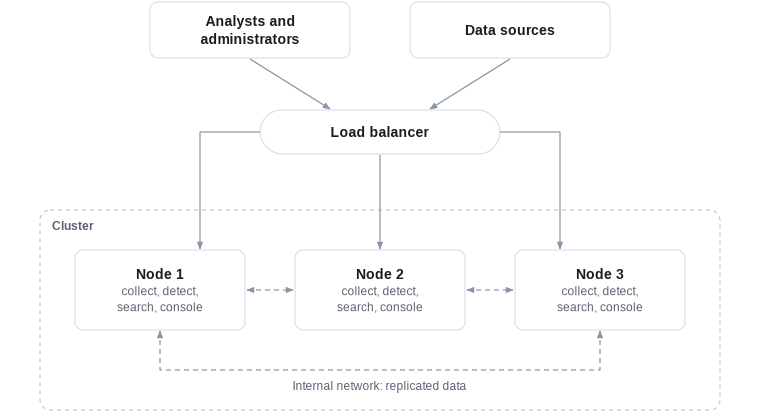
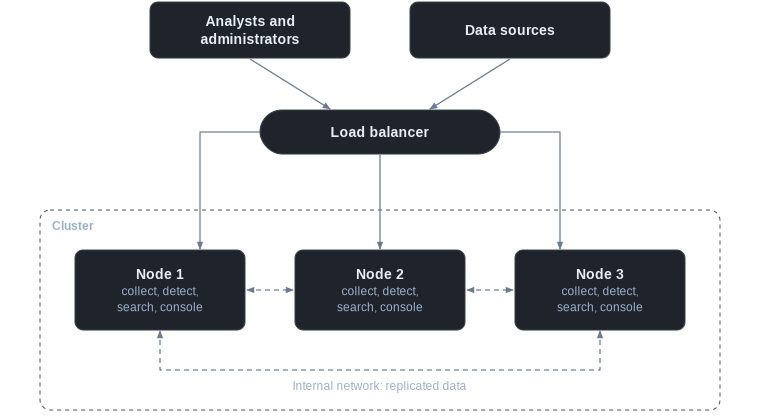
- Every node is active. Each node runs the whole service: it collects events, processes and detects, answers searches and serves the console. A load balancer that you provide spreads the console and incoming events across the nodes.
- Data is replicated across nodes. Stored events, and events still being processed, are kept in more than one copy, on different nodes. No single node holds the only copy of anything the Cluster has stored.
- Work that must run once runs once. Scheduled tasks such as correlation schedules, reports and retention are coordinated so that each runs on one node at a time, and moves to another node if that node fails.
- Majority rule. The Cluster keeps serving while a majority of its nodes are available and can reach each other. Nodes that are cut off from the majority stop accepting writes, so a network split never produces two diverging copies.
- One address. Users and data sources use the load balancer's address. They never need to know which node serves them.
Node loss
| Nodes in the Cluster | Nodes that can fail while the Cluster keeps serving |
|---|---|
| 3 | 1 |
| 4 | 1 |
| 5 | 2 |
When a node fails, the load balancer stops sending it traffic, and the remaining nodes carry the work. Data stored before the failure stays available from its other copies. Until the node returns or is replaced, the Cluster has less spare capacity and fewer copies of some data, so return or replace it promptly.
Use an odd number of nodes: a fourth node adds capacity, but not tolerance of a further failure.
What a Cluster does not do
- It is not a backup. A mistaken deletion is applied to every copy. Keep backups outside the Cluster.
- It is not disaster recovery. All nodes are on one site. For the loss of the site, restore from backups at another site.
- It does not keep every in-flight event. When a node fails, events that a UDP sender had just sent to it can be lost, unless the sender buffers them. TCP senders reconnect through the load balancer.
Licence
Each Cluster node is activated with its own activation code. A node without a valid licence of its own does not run licensed collection and detection. See Activation on an HA pair or a Cluster.
In this section
| Page | What it covers |
|---|---|
| Plan a Cluster | Nodes, sizing, network, time and licence activation. |
| Load balancer requirements | What the load balancer in front of the Cluster must do. |
| Install a Cluster | Install the first nodes, add a node, verify. |
| Operate a Cluster | Status, node failure, maintenance, removing and replacing a node, upgrades. |
| HA and Cluster problems | Symptoms and what to do. |