Deployment models
ThreatVIS Unified Security Operations Platform is deployed in one of three models: Standalone, High Availability (HA) and Cluster. This page explains what each model gives you, what it needs, and how to choose. Every model runs the same product and the same release, and every model is installed from the same release bundle with a different installer profile.
Choose a model
Answer these questions in order. The first answer that fits gives your model.
| Question | If yes | Then read |
|---|---|---|
| Is one node too small for your event volume, retention or search load? | Cluster | Plan a Cluster, Load balancer requirements, Install a Cluster |
| Must the SOC keep collecting and working Cases when one server fails, and can you place two nodes on one site or at metro distance? | High Availability | Plan an HA deployment, Install an HA pair |
| Neither of the above: a short outage while you repair or restore the appliance is acceptable | Standalone | Appliance requirements, Install the appliance |
The model is chosen when the hosts are installed. Moving an existing appliance to another model needs support; see Moving between models.
At a glance
| Standalone | High Availability | Cluster | |
|---|---|---|---|
| Purpose | One appliance | Keep the service running when one node fails | Scale out ingestion and search, and tolerate node loss |
| Processing nodes | 1 | 2 (one active, one passive) | 3 or more, all active |
| Additional hosts | None | 1 witness | None |
| How users and data sources reach it | The appliance address | One floating service address | A load balancer that you provide |
| Data protection | Local storage | Synchronous, encrypted replication of all state to the passive node | Replicated copies of data spread across the nodes |
| Capacity | One node | One node (the passive node adds resilience, not capacity) | Grows with the number of nodes |
| Failover | Not applicable | Manual (operator-confirmed) or automatic | Continuous: the remaining nodes keep serving |
| Typical use | Small and medium environments, evaluation, sites where a short outage for repair is acceptable | Environments where the SOC must keep collecting and working Cases through the loss of a server | Large environments whose event volume or search load is more than one node can carry |
Standalone
A Standalone deployment is one appliance on one host. It collects, stores, detects and serves the console on that host. It is the simplest model to install and run, and it is the default installer profile.
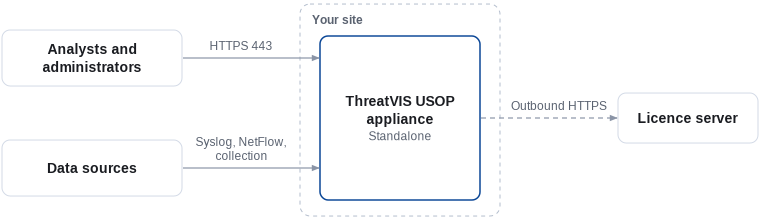
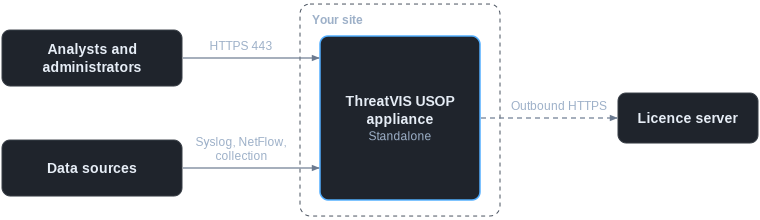
Choose Standalone when a planned or unplanned outage of the appliance, while you repair or restore it, is acceptable for your SOC.
What you need: one host that meets the appliance requirements. Protect the appliance with backups kept outside the host.
High Availability
An HA deployment, also called an HA pair, runs on two identical processing nodes and one small witness host.
- One active node. At any time exactly one node, the active node, runs the service, holds the data and answers on the floating service address. The other node is passive: it runs no workload and serves no console.
- Synchronous replication. Every change the active node writes is copied to the passive node before it is acknowledged, over an encrypted link between the two nodes. The passive node always holds a current copy.
- Floating service address. Users, data sources and integrations use one address. It moves to whichever node is active, so nothing needs to be reconfigured after a switchover or failover.
- Witness. The witness casts the deciding vote when the two nodes lose contact with each other, so that only one side may keep running. It stores no data and runs no ThreatVIS USOP service.
- Fencing. Before a node takes over after an unplanned failure, the old active node must be proven unable to write. Automatic failover uses a fencing method that suits your platform, such as a hardware or hypervisor watchdog or power control through VMware vCenter or IPMI and Redfish out-of-band management. With manual failover, the operator confirms it.
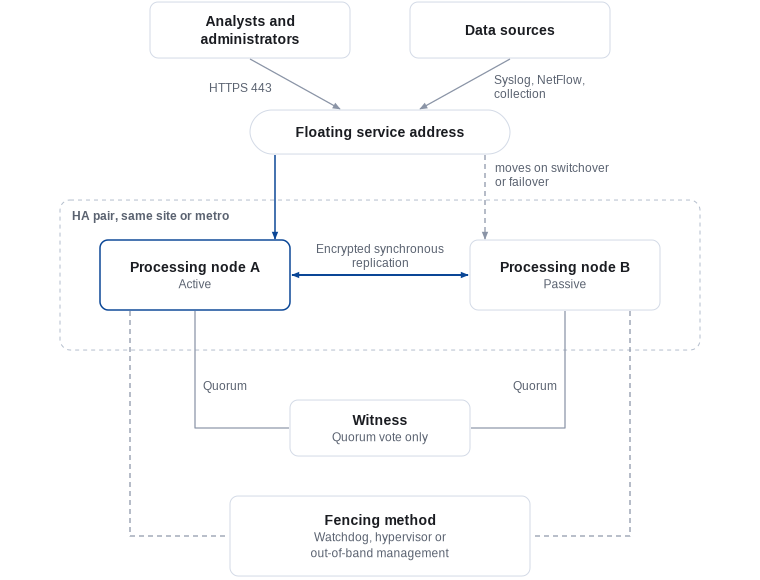
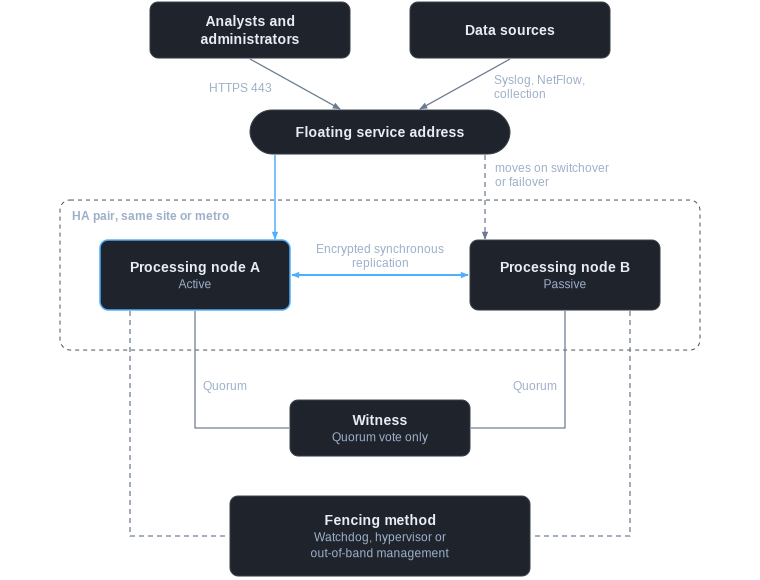
Choose HA when the SOC must keep collecting events and working Cases through the loss of one server, and your two nodes can be placed on the same site or on two sites close enough for synchronous replication.
What you need:
- two processing nodes of identical size, each sized for your full workload, plus one dedicated replication disk of the same size on each;
- one witness host in a separate failure domain from both nodes;
- the nodes and the floating service address on the same network, and a reliable, low-latency link between the nodes;
- synchronised time on all three hosts;
- for automatic failover, a supported fencing method for your platform.
See High availability for how failover works and the full requirements.
What HA does not do
- It does not add capacity. The passive node does no processing. Size each node for the whole workload.
- It is not a backup. A mistaken deletion or a corrupted record is replicated to the passive node at once. Keep backups outside the HA pair.
- It is not disaster recovery. Synchronous replication needs the nodes close together. Recovery from the loss of a whole site uses backups restored at another site, and is always started by an operator.
- It does not keep every in-flight event. While the service moves between nodes, nobody listens on the floating address for a short time. Senders that buffer and retry, and sources that ThreatVIS USOP pulls from, resume without loss. UDP senders that do not buffer lose what they send during the move.
Cluster
A Cluster runs on three or more processing nodes that are all active. A load balancer that you provide spreads console sessions and incoming events across the nodes.
- All nodes work. Every node collects, processes, detects and answers searches, so capacity grows as you add nodes.
- Replicated data. Stored events, and events still being processed, are kept in copies on different nodes, so the loss of one node loses no stored data and the remaining nodes continue.
- Majority rule. The Cluster keeps running while a majority of its nodes are available. A three-node Cluster tolerates the loss of one node.
- One address. Users and data sources use the load balancer's address, never an individual node.
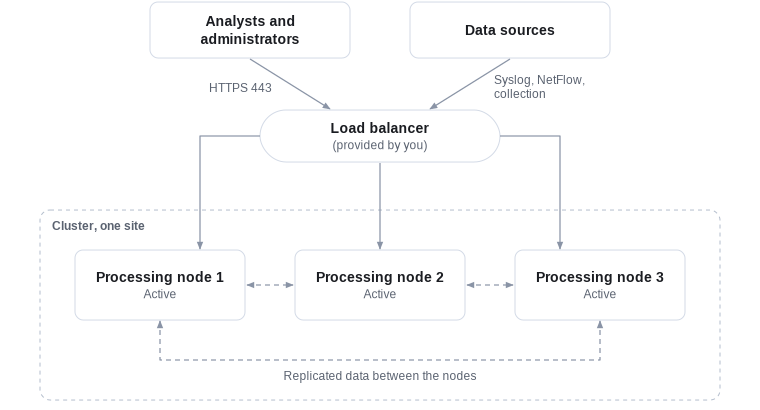
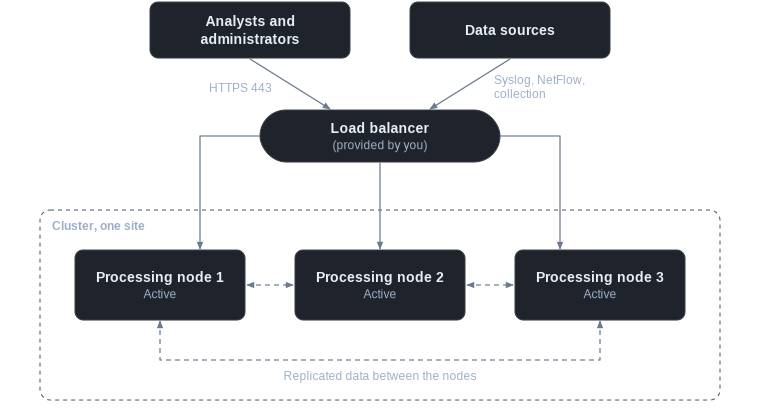
Choose Cluster when your event volume, retention or search load is more than one node can carry, or when you want capacity and node-loss tolerance at the same time.
What you need: at least three identical processing nodes on one site, a load balancer that meets the load balancer requirements, and synchronised time on every node. See Cluster.
Moving between models
The model is chosen when a host is installed. When an HA pair is established, the data of one node, the one you name as the first active node, becomes the data of the deployment and the other node receives a copy. Two independent deployments are never merged. To move an existing Standalone appliance into an HA pair or a Cluster, contact ThreatVIS USOP support to plan the move of your data.
Next steps
- Standalone: Appliance requirements, then Install the appliance
- High Availability: Plan an HA deployment
- Cluster: Plan a Cluster