High availability
A ThreatVIS Unified Security Operations Platform HA pair keeps the service available when one server fails. This page explains how the pair works, what happens when something fails, and how the console behaves on an HA deployment. To compare HA with the other models, see Deployment models.
The three hosts
| Host | Installer profile | What it does |
|---|---|---|
| Processing node A | HA Processing Node | Runs the full ThreatVIS USOP service when it is the active node. |
| Processing node B | HA Processing Node | Identical to node A. Holds a synchronous copy of all data while passive. |
| Witness | HA Witness | Casts a quorum vote. Runs no ThreatVIS USOP service and stores no data. |
The two processing nodes are equal: either can be active. The node that runs the service is the active node. The other node is the passive node, also shown as the standby.
How it works
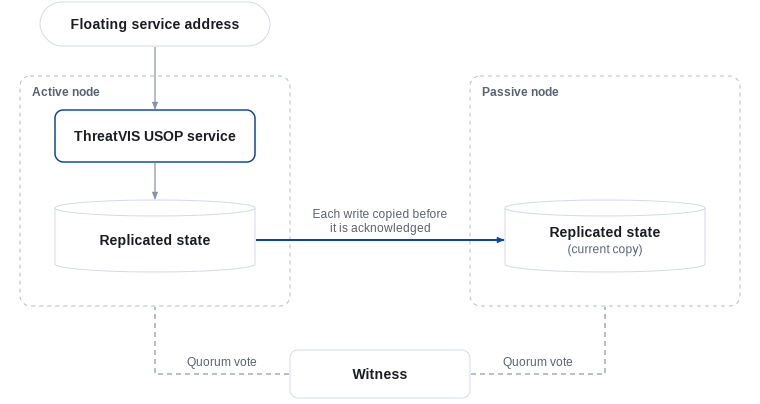
- One writer. Only the active node uses the data, runs the service and answers on the floating service address. Every safeguard in the pair exists to make sure two nodes never write at the same time. When that cannot be proven, the pair stops the service rather than risk two writers.
- All state is replicated. Events, Cases and their attachments, settings, detection content, the audit trail, report output and SOAR data are all replicated. Each node keeps its own identity, licence, release files and logs, which are never copied to the other node.
- Synchronous and encrypted. A write is acknowledged only once both nodes hold it. Replication is encrypted, and each node accepts it only from the other node.
- The floating service address moves last. On a switchover or failover, the new active node starts the service and checks that it is ready before it takes the floating address.
- The witness decides, but does not fence. If the two nodes lose contact, the witness gives its vote to one side, and the side without a majority stops. A vote alone cannot prove that the other node has stopped writing, which is why fencing exists.
Failover modes
The pair runs in one of two modes. You choose the mode, and you can change it.
| Manual failover | Automatic failover | |
|---|---|---|
| Planned switchover | An operator command; the service moves in an orderly way | The same |
| When the active node fails | The passive node does not take over by itself. The service stays stopped until an operator confirms the failed node is down and starts recovery | The passive node takes over by itself once fencing has made the failed node safe |
| Fencing method | Not required. The operator's confirmation replaces it | Required, and commissioned on your platform |
| Failback | Not applicable | Never automatic. Move the service back with a planned switchover |
| Best for | Every deployment at first; platforms without a supported fencing method; metro deployments without an independent fencing path | Deployments that need the service back without waiting for an operator |
Every HA pair is established in manual failover mode. You turn on automatic failover afterwards, once its checks pass. See Choose manual or automatic failover.
Fencing
Fencing proves that a failed active node can no longer write before the other node takes over. Without it, a node that is frozen rather than stopped could wake up and write to data that the other node now owns.
| Method | How it fences | Typical platform |
|---|---|---|
| Hardware watchdog | A node that loses its majority, or whose HA services stop answering, is restarted by the hardware | Bare-metal servers |
| Hypervisor-backed watchdog | The same, with a watchdog device that the hypervisor provides and enforces | Virtual machines |
| Power control | The surviving side asks an authority outside the failed node to power it off, and waits for confirmation | VMware vCenter; IPMI or Redfish out-of-band management |
| Operator confirmation | An operator confirms that the failed node is powered off before recovery starts | Manual failover on any platform |
A software-only watchdog inside the guest is not accepted for automatic failover, because it cannot act while a virtual machine is paused. See Plan an HA deployment.
What happens when something fails
| Failure | What the pair does | Effect on the service |
|---|---|---|
| The passive node fails or restarts | The active node keeps serving. The passive node rejoins as passive and catches up on what it missed. | None. Until it catches up, there is no standby. |
| The witness fails | Both nodes keep their majority (two votes of three). | None, but one more failure stops the service. Restore the witness promptly. |
| The active node fails, manual failover | The passive node stays passive. | Down until an operator confirms the failed node is off and recovers on the passive node. |
| The active node fails, automatic failover | The passive node and the witness keep the majority, fence the failed node, then start the service. | A short outage while the failure is detected, the failed node is fenced and the service starts. |
| The nodes lose contact but both reach the witness | The witness gives its vote to one side. The other side stops. | In manual failover, the service continues if the active side kept the vote. Otherwise it stops until an operator acts. Never two writers. |
| The active node is cut off from both the passive node and the witness | The active node loses its majority and stops itself. | In manual failover, down until an operator confirms and recovers. In automatic failover, the passive node takes over after fencing. |
| The witness and one node fail together | No side has a majority. | The service stops. It returns when either host returns. |
| The fencing method is unavailable | Automatic takeover cannot happen. | None while the active node is healthy. If it then fails, recovery is manual. |
| A failed node returns | It rejoins as passive and copies what changed. It never takes the service back by itself. | None |
Events during a switchover or failover
Data that ThreatVIS USOP had stored before the move is kept. While the service moves, nobody answers on the floating address for a short time:
- UDP syslog and NetFlow: anything sent while nobody listens is lost, unless the sender buffers it.
- TCP and TLS syslog: a sender reconnects to the new active node. What it wrote into the old connection as the move happened can be lost, unless the sender queues and resends.
- Pulled sources (databases, files and vendor APIs): collection resumes from where it stopped. A pull that was in progress can be repeated.
The console on an HA deployment
You use the console at the floating service address. The passive node serves no console.
Some Settings pages change the host rather than the data. On an HA pair, these pages show a note titled with the node that is serving the console, and say where the change takes effect:
| Page | On an HA pair |
|---|---|
| SSL Settings | The certificate is stored with the replicated configuration, so the console serves it from whichever node is active. |
| Interfaces & Proxy, proxy | The outbound proxy is stored with the replicated configuration and applied on both nodes. A proxy user name and password cannot be used. |
| Interfaces & Proxy, interfaces | A change applies only to the node serving the console. Interfaces that carry the traffic between the hosts of the pair, or the floating service address, cannot be changed here. |
| DNS | Applied on the active node, then on the other node within about a minute. |
| System Clock | The timezone and NTP servers are applied on both nodes. NTP cannot be turned off. |
For the DNS, clock, proxy and interface pages, the note also shows whether each node has applied the current host settings.
In this section
| Page | What it covers |
|---|---|
| Plan an HA deployment | Hosts, disks, network, ports, time, fencing and the deployment profile. |
| Install an HA pair | Install the witness and both nodes, establish the pair and verify it. |
| Operate an HA pair | Check status, switch over for maintenance, recover from a failure, replace a node. |
| Choose manual or automatic failover | How to choose, commission fencing, and turn automatic failover on or off. |
| Upgrade an HA pair | The coordinated, one-node-at-a-time upgrade. |
| HA and Cluster problems | Symptoms and what to do. |