Plan an HA deployment
This page lists what you prepare before you install a ThreatVIS Unified Security Operations Platform HA pair: the three hosts, the replication disks, the network and ports, time synchronisation, the fencing method and the deployment profile. Work through the planning checklist at the end before you start Install an HA pair.
Hosts
| Item | Processing nodes (two) | Witness (one) |
|---|---|---|
| Operating system | Ubuntu Server 24.04 LTS (amd64), the same on both nodes. | Ubuntu Server 24.04 LTS (amd64). |
| Size | Identical on both nodes. Each node at least meets the appliance requirements and is sized for your whole workload, because one node carries it alone. | Small. 1 vCPU, 1 GB of memory and 10 GB of disk are enough. |
| Disks | A system disk, plus one dedicated replication disk. See Replication disks. | A system disk. |
| Host name | Unique, and equal to the name you give the node in the deployment profile. | Unique. |
| Software | A clean host. Do not install other ThreatVIS USOP software or clustering software on it beforehand. | A clean host that is not, and will never be, a processing node. |
| Access | Root access and administrative SSH key access. | Root access and administrative SSH key access. |
The installer creates the local accounts it needs, identically on both nodes. It refuses a host whose existing local accounts conflict with them. Install on hosts that were built for this purpose.
Each release supports specific kernel versions. Install a kernel your release supports; the pre-installation check reports any difference. If UEFI Secure Boot is on, the installation asks you to enrol a key, and you confirm the enrolment at the host console on the next restart.
Place the hosts in separate failure domains
Put node A, node B and the witness on three different physical hosts, with independent power where you can. On a hypervisor, use anti-affinity rules so that no two of them run on the same physical host. Put the witness where a failure of either node's host, power or network does not also take the witness down.
Replication disks
Each processing node has one dedicated disk that holds all replicated data: events, Cases, settings, the audit trail, report output and SOAR data. Size it for your retention, as you would the data storage of a Standalone appliance.
The replication disk on each node must:
- have exactly the same size in bytes on both nodes;
- be blank: no partition table, file system, volume manager or RAID signature, not mounted and not in use;
- be identified by a persistent device path under
/dev/disk/by-id/, never by a name such as/dev/sdbthat can change between restarts. On VMware, enable disk UUIDs for the virtual machine so that the disk has a persistent identifier; - on a hypervisor, be fully allocated (thick-provisioned or fixed-size), and sit on different storage for the two nodes where possible, so that one storage failure does not affect both copies.
The installer initialises a replication disk only if it is blank and only after you confirm its exact path. A disk that holds anything is refused.
Network
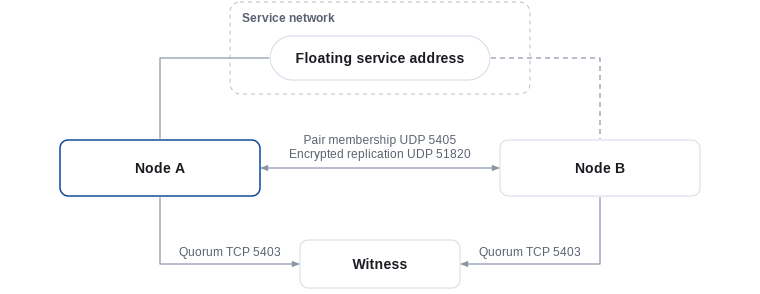
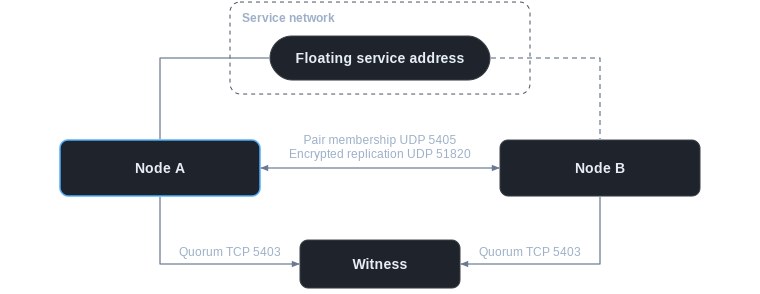
- One subnet for the service. Both nodes have an interface on the same subnet as the floating service address, so that the address can move between them. Reserve an unused address in that subnet for it.
- A reliable, low-latency link between the nodes. Every write waits for the other node, so the link's latency is added to the write path. Place the nodes on the same site, or on two sites close enough for synchronous replication (metro distance). A link of 1 Gbit/s or faster is recommended. Its throughput also sets how long the first full copy takes, and how long a replaced node takes to catch up.
- The witness reaches both nodes independently. On two sites, put the witness on a third site.
- A name for the console. Create a DNS name for the console that resolves to the floating service address, and a TLS certificate for that name. Users and data sources only ever use that name or address, never a node's own address.
- A secure way to copy files between the hosts, such as SSH. Establishing the pair copies keys and certificates between the hosts. You copy them; they never travel in clear text.
Ports
| From | To | Port | Purpose |
|---|---|---|---|
| Node A and node B | Each other | UDP 5405 | Membership of the pair, encrypted. |
| Node A and node B | Each other | UDP 51820, or the port you set in the deployment profile | Encrypted replication. Each node accepts it only from the other node. |
| Node A and node B | Witness | TCP 5403 | The quorum vote, over TLS. |
| Node A and node B | Each other and the witness | ICMP echo | Recommended. The pre-installation check uses it, but does not require it. |
| Analysts and administrators | Floating service address | TCP 443 | The console. |
| Data sources | Floating service address | UDP 514, UDP 2055 and the other collection ports you use | Event collection. See Ports to open. |
| Node A and node B | Licence server | HTTPS | Each node activates and synchronises its own licence. |
| Node A and node B | Ubuntu package repositories and the Python package index | HTTPS | During installation and upgrades, as for a Standalone appliance. |
| All three hosts | Your time servers | UDP 123 | Time synchronisation. |
| Node A and node B | Your fencing authority | HTTPS 443 to VMware vCenter, or UDP 623 (IPMI) or HTTPS 443 (Redfish) to each node's management controller | Only for a power-control fencing method. |
Open these ports only between the hosts listed. Data sources and users never need to reach a node's own address or the witness.
Time synchronisation
All three hosts must keep accurate, synchronised time: each must be synchronised to a time source, with a clock error of one second or less. The pre-installation and readiness checks refuse a host whose time is not synchronised; having a time service installed is not enough.
Give the hosts at least two reliable NTP servers they can reach. On HA nodes, the System Clock page in the console sets the NTP servers on both nodes, and NTP cannot be turned off. See Set the system clock.
Choose a fencing method
The fencing method decides whether you can use automatic failover. Manual failover needs no fencing method: the operator confirms that a failed node is off before recovery. See Choose manual or automatic failover.
| Platform | Fencing method for automatic failover | Notes |
|---|---|---|
| Bare-metal servers | A hardware watchdog on each node, or power control through each server's out-of-band management (IPMI or Redfish) | Put the management controllers on a separate management network that the other node can reach. |
| VMware vSphere | A hypervisor-backed watchdog, or power control through VMware vCenter | Give the fencing account power operations on the two node virtual machines only. If vCenter runs on the hosts it protects, it can be unavailable when it is needed; automatic takeover then waits for the operator. |
| Other hypervisors, such as Microsoft Hyper-V | Where no supported fencing method is available, use manual failover | Use fixed-size virtual disks for the replication disks. |
| Any platform with only a software watchdog inside the operating system | Not accepted for automatic failover | A software watchdog cannot act while a virtual machine is paused. Use manual failover. |
ThreatVIS USOP support confirms the fencing method for your platform during planning. A fencing method is used for automatic failover only after it has passed commissioning on your own hosts: a test that resets each node once to prove the method works.
Virtual machine guidance
On any hypervisor:
- Do not snapshot, suspend, pause or live-migrate the active node. Each briefly freezes the virtual machine. Switch the service to the other node first.
- Exclude the node virtual machines from snapshot-based backup products. A backup snapshot freezes the virtual machine in the same way. Use settings backups for the configuration.
- Use the hypervisor's paravirtual network adapter for the nodes.
- If the hypervisor restarts failed virtual machines on another host, that is safe: a restarted node rejoins as passive. Turn off any feature that restarts a virtual machine because it stopped responding, so that it does not race with fencing.
Metro deployments
On two sites, automatic failover needs all of the following. If any is missing, use manual failover.
- the witness on a third site that both sites reach independently;
- a fencing method that still works from the surviving site when the other site is cut off;
- a link between the sites with the latency that synchronous replication needs.
HA across two sites is not disaster recovery: it assumes the sites are close and that the witness can still decide. For the loss of a whole site, restore from backups at another site.
The deployment profile
One file, the deployment profile, describes the whole pair. Every host reads the same file, so copy the finished file to all three. A template is included in the release bundle.
| Information | What to enter |
|---|---|
| Deployment identity | One identity for the deployment, in the format the template shows. Both nodes use the same value. It is set once and never changed. |
| Each node | Its host name, its own address for traffic between the nodes, its replication address, and the persistent path of its replication disk. |
| Witness | Its address and quorum port (TCP 5403). |
| Floating service address | The address, its netmask and the network interface that carries it on both nodes. |
| Replication | Its UDP port and a small private network used only for replication. That network must not overlap your other networks or the floating service address. |
| Replication disk size | The exact size of the replication disks, in bytes. |
| First active node | The node whose data becomes the deployment's data, and which is active first. |
| Environment | production. |
| Failover | Leave it out for manual failover. For automatic failover, the fencing method and its settings. |
The installation checks the profile before it changes anything, and refuses a profile with an error.
Planning checklist
- Two identical processing nodes and one witness, on separate physical hosts.
- Ubuntu Server 24.04 LTS on all three, with the supported kernel.
- A blank replication disk of the same exact size on each node, with its persistent path recorded.
- An unused floating service address in the nodes' subnet, a DNS name for it, and a TLS certificate.
- The ports above open between the hosts, and from users and data sources to the floating address only.
- Time synchronised on all three hosts within one second.
- A fencing method chosen, or a decision to run with manual failover.
- The activation codes you were given for the processing nodes.
- The release bundle and the release public key.
- The deployment profile completed and copied to all three hosts.