Upgrade an HA pair
This page explains how to upgrade a ThreatVIS Unified Security Operations Platform HA pair to a new release. An HA pair is upgraded one node at a time with the coordinated upgrade: the passive node first, then a planned switchover to it, then the other node. The service is unavailable only during the switchover.
Role needed: a person with root access to both processing nodes. The upgrade is done from a shell on the nodes with the HA upgrade tool from the new release bundle.
The Standalone upgrade refuses to run on an HA node. Always use the coordinated upgrade on an HA pair.
Before you begin
- Read the release notes of the new release.
- Take a settings backup.
- Copy the new release bundle to both nodes and extract it. Have the release public key.
- The pair is healthy: both nodes online, the pair has its majority, both copies connected and up to date, no failed services, and both nodes on the same release. The upgrade refuses to start otherwise.
- Decide where the upgrade's recovery point is written: a destination outside the HA pair, and the public key it is encrypted for.
- Choose a maintenance window for the switchover.
Steps
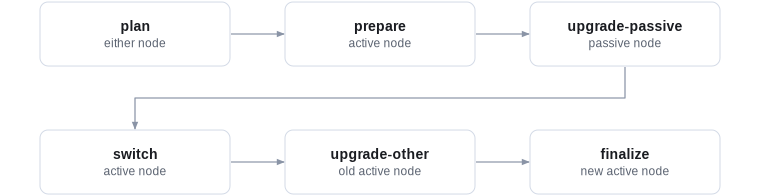
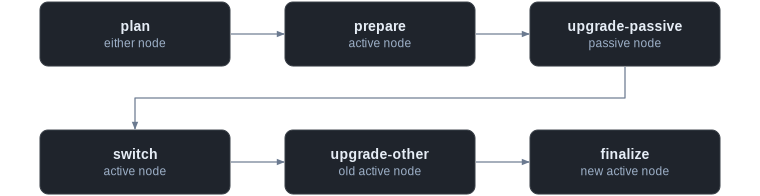
Run each step with the HA upgrade tool from the new bundle, on the node named.
plan, on either node. Read-only. It verifies the new bundle against the release public key and shows the installed and new releases, the role of each node and anything that would block the upgrade.prepare, on the active node. It checks the health of the pair, writes a recovery point of the deployment's data to the destination you name, and starts the upgrade.upgrade-passive, on the passive node. It installs the new release on the passive node only. It changes no shared data and starts no service. While it runs, the passive node cannot take the service.switch, on the active node. A planned switchover to the upgraded node. The upgraded node updates the data for the new release, starts the service, and records the new release as the deployment's release. This is the only step with an outage.upgrade-other, on the old active node, now passive. The same as step 3.finalize, on the new active node. It checks that both nodes report the new release, and closes the upgrade.
You should see after finalize: both nodes on the new release, the new active node active, the other
standby and ready. In the console, Settings, System Update shows the new Version. The upgrade tool's
status shows the state of an upgrade at any time.
The service stays on the node that was passive at the start. Make a planned switchover afterwards if you want it back on the other node.
If a step fails
| Where it fails | What happens | What to do |
|---|---|---|
plan or prepare refuses | Nothing has changed. | Correct the reported problem, such as an unhealthy pair or different releases, and start again. |
upgrade-passive fails | The upgrade tool rolls the passive node back to its previous release itself. | Run abort on the active node to withdraw the upgrade, correct the problem and start again. |
switch fails before the new release changed any data | The service switches back to the original node automatically. | Run rollback-passive on the upgraded node to restore its previous release, then abort on the active node. |
switch fails after the new release began changing data | The service is held stopped on both nodes. It is never returned to the previous release, because the data has already been changed for the new one. | Contact ThreatVIS USOP support. Either the upgraded node is repaired and started, or the recovery point taken by prepare is restored. |
upgrade-other fails | The tool rolls that node back. The service keeps running on the upgraded node. | Correct the problem and run upgrade-other again. |
abort withdraws an upgrade only while no data has been changed for the new release. Once data has been
changed, any attempt to run the service on the previous release is refused, whether by the upgrade tool, a
switchover, or a recovery.